®
® 


 ®
® 






What is PWA and why should you care?
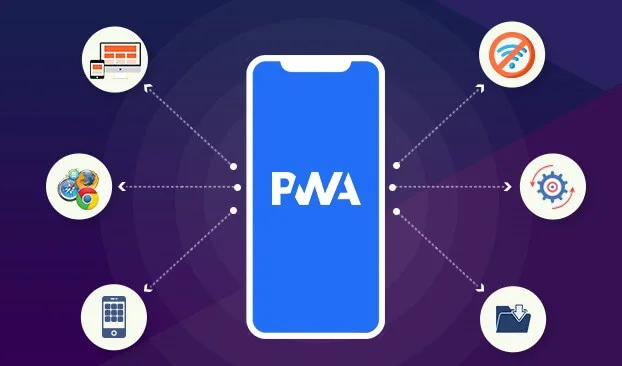
PWA (Progressive Web Application) is a technology that allows you to use your existing web portal as an application. It’s a relatively new technology, and a common problem with new technologies is the risk associated with applying them in practice and business. New and praised things are interesting. However, that’s not a sufficient reason to use a given technology in business. Fortunately, PWA has much more to offer. What I like about this technology is the elimination of the need for the AppStore, Google Play, and paying their commissions. This means the end of the cumbersome process of updating and maintaining applications in accordance with these stores’ policies. With PWA, users install your application using a special link or during a visit to your website. Nothing simpler. The app won’t be rejected, doesn’t go through vendors’ internal processes – making changes is barely different from simply building the application. Thanks to PWA being a responsive solution, code written once will be scalable and perfectly adapted to any screen. In a sense, using PWA reduces risk and threats during web application development.
Google explains that PWA (Progressive Web App) consists of several fundamental concepts.
- PWA should be independent – different internet speeds should not cause errors,
- It should be fast – images and content should be “lazy-loaded,” meaning loaded as the user scrolls to their location on the page and stored in device memory,
- PWA should be “engaging.” By this I mean it should behave like a native mobile application, which primarily means the ability to be installed on a phone or tablet home screen,
- And finally, PWA, as the name suggests, should be progressive – adapting to new functionalities when available and continuing to work correctly when they’re not supported.
Google Lighthouse
Google provides an automated tool that allows you to audit your application and ensure its content meets the above criteria. This tool rates the application on a scale from 0 to 100 and informs you what needs to be changed to improve that score. Required actions may include:
- Delivering content via HTTPS,
- Improving page load time,
- Adding a manifest and other files required for application installation.
Where to look for examples?
Building your own PWA requires studying examples and getting to know the best products of this type on the market. Thinking in these terms, we should mention examples like Instagram, Facebook, Uber, Starbucks, and large online stores like Mohito, or portals like Olx, Onet, or Google Maps. There are many examples, and consequently, there’s no shortage of inspiration, models, and predecessors.
But why PWA?
I don’t run a large company; I don’t need a portal like Starbucks or Instagram. I build websites for clients. Websites that are meant to be exceptional and professional. Sometimes, however, clients would like to have a mobile application for their portal. The process of creating these applications is complicated, time-consuming, and consequently expensive. Building and delivering a standard mobile application requires:
- Having a developer account (Apple – $100/year, Google – $25 one-time),
- Understanding, creating, and installing device profiles for the platforms you plan to support,
- Creating and installing appropriate signing certificates used to encode the application and certify its authorship,
- Deciding which devices will be supported,
- Of course, writing, designing, and building the application,
- Signing the application with the previously created certificate,
- Packaging the application and publishing it in each store.
If you think that’s everything, unfortunately I must disappoint you. Before making the application publicly available, you still need to provide quite a few files and information, including:
- Graphic and video files showcasing your application in multiple resolutions and across multiple devices,
- Application icons in multiple resolutions,
- A form determining the appropriate age range for the audience,
- The price of the application (on Google, once the price is set to $0, you can never charge for it),
- Privacy policy and other legal documents.
Okay… Assuming these steps have been completed and all files provided, you can submit the application for review and wait. In the past, this process took weeks. Despite being significantly shortened, you have no control over it. If anything was forgotten, the application will be rejected and you must resubmit. It can even happen that despite correctly filling out the submission, it gets rejected – and there’s nothing you can do about it.
PWA to the rescue!
PWA (Progressive Web Application) is nothing more than an application you see in your browser. Its preparation is usually preceded by the creation and publication of a standard website (an application built with Angular technology). If you already have such a portal, we can get to work right away, but if you don’t, we’ll happily create everything from scratch. All work begins with conducting an audit using the aforementioned Google Lighthouse tool. It’s an excellent tool that instantly tells you what needs to be changed and improved on the site to give users the ability to install the website as an application. These might be fixes related to offline connectivity notices, lack of JavaScript support, and much more.
What are the side benefits of creating a PWA?
First and foremost, the page loading speed increases and the update delivery process improves. Right after starting work on PWA, we determine which method of visualizing new versions will be appropriate. Typically, seamless automatic updating is chosen. Thanks to this, the user won’t be distracted, and new content will be downloaded automatically. Content that doesn’t change is stored on the target device. Additionally, using PWA enables the application to work even when the device is offline. A single content download is enough to save and store it on the device. Features requiring server connection will be disabled when possible, and the user can be informed about the lack of connectivity and the need to connect to the internet.
Push Notifications
Every mobile application has push notifications. These are notifications sent to users’ screens when an event occurs. With the development of PWA, the ability to send notifications to users even when they’re not on the site has also emerged. This revolution caused a sudden and rapid increase in PWA popularity. Unfortunately, as of now, this capability is supported by all browsers except Safari on iOS. It’s only known that Apple developers are working on this feature, but it’s not yet available. However, this is not a problem without a solution. Currently, there are temporary solutions for iOS users – Messenger or SMS notifications. All happy Android users can already enjoy the full (almost!) functionality of a mobile application in their browser thanks to PWA!